Casino
  Promotions
  Sign Up
  Search
 Discover
  Slots
Slots  Table Games
  All Games
 Fishandspins Casino Login and Instant Access to Your Games
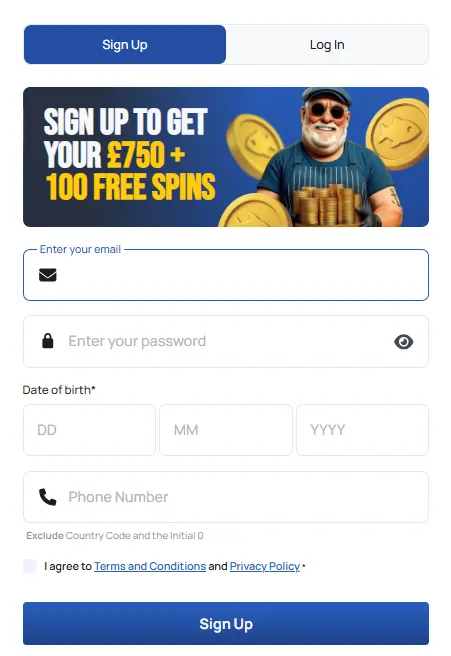
The easy FishandSpins Casino registration process is all that stands between you and a 150% welcome bonus of up to £750; we’ll also give you 100 complimentary spins for Blast the Bass when you sign up. The procedure at Casino Fish and Spins takes just a few taps; you can register with your email and phone number and once you’re a full-fledged member you’ll get to climb 7 tiers in our VIP programme, participate in weekly tournaments and play jackpots, Megaways, RNG tables, crash and live dealer titles from more than 110 providers. Use our guide to learn how to make your account.
How to Create a FishandSpins Login Account
If you’re at least 18 years old and are physically located anywhere in the UK, you can sign up in literally minutes.
- To start, just press the Join Now button in the top right. You can begin the registration process from any desktop PC, mobile phone or a tablet.
- Fill out your email address, phone number and date of birth and your account will be ready.
- You can skip the FishandSpins Casino login page afterward – new players are automatically signed in after registration.
However, you can’t start playing without a balance, so tap the Deposit button in the top right edge, choose from the list of available methods and complete your initial deposit. If your first payment was £20 or more, you’ll automatically qualify for a 150% boost of up to £750 + 100 plays on the house, dispensed over 5 days. Now that you’re an official member, you can explore our gaming section filled with over 5,000 titles, take a peek at The Chippy Club to see which rewards are available at each VIP tier and check which tournaments are currently running.
Account Verification
Verification begins with a FishandSpins Casino login. Open your Profile and tap Verification, and you’ll see three separate KYC tabs including Identity, Address and Payment Verification sections. You can complete this step by simply taking a selfie and uploading it alongside a government issued document that displays your name and key personal details, meaning you can use your passport or driver’s licence.
The address verification part is just as simple – just submit an official document that shows your address and name such as a recent utility bill or a bank statement. Payment method verification is only necessary if you decide to withdraw using a Bank Transfer; in that case, you’ll need to take a screenshot or upload a photo showing your online banking page or simply send a bank statement. We let all our members start the verification process once they’ve fully settled in, but it’s recommended to complete it at as soon as you’ve finished the FishandSpins Casino sign up part. KYC checks are mandatory for compliance on our end and for withdrawals on yours, as you can’t cash out with a basic account.
Login Process
The FishandSpins Casino login will only be necessary if you switch to a different device or manually log out; otherwise, you’ll remain logged in after registering. If you need to get back to your account, provided that you’ve already made one, visit our official website and follow the steps below:
- Locate the Login Button: Open the homepage and tap the ‘Log In’ button situated in the top right corner of the screen.
- Enter Credentials: In the pop-up window, provide the email address you used during the registration process.
- Provide Password: Carefully type your unique password into the designated field. Ensure your caps lock is off to avoid any entry errors.
- Access Your Profile: Click the final ‘Log In’ button at the bottom of the form to immediately access your account, balance, and game history.
If you can’t remember your password and email address or need any help with the FishandSpins Casino login, feel free to contact our support team via live chat and read our troubleshooting tips in this guide.
FishandSpins Login via Mobile App
If you prefer gambling on the go, you can download our free Progressive Web App and perform FishandSpins Casino registration and login from your mobile phone. Go to our site from your smartphone’s browser and select the Install at the top. After installing our app, you will be able to access all the features of our casino as if you were playing from a desktop computer, including:
- Enjoy more than 5,000 slots, progressives, tumblers, cards and other games from 110+ software suppliers
- Get your 150% first deposit booster of up to £750 and 100 bonus games
- Participate in tournaments and drops campaigns
- Grab reload deals and free spins during the Fish & Chips Happy Hour
- Manage your bankroll with instant crypto payments
Personal Data
We only collect the information that’s legally required by our iGaming regulator. Our team collects the personal details you provide during your FishandSpins Casino registration and verification procedures, as well as the information shared through chat and email correspondence. Every bit of information procured this way is used to provide British players with an ever-improving experience, provide timely customer service and to ensure that no illegal activities like underage gambling occur on our site.
Possible FishandSpins Login Issues for New Players
The majority of our UK players haven’t faced any FishandSpins login issues, since the process is a breeze. However, there are a couple of fairly common issues that may prevent you from registering or signing in to your profile.
| Issue | Cause | Solution |
|---|---|---|
| Access Denied | Being outside the UK or using a VPN/proxy service. | Ensure you are in Great Britain and disable any third-party proxy or VPN services. |
| Password Errors | Typos or hidden characters during entry. | Tap the Eye icon to reveal your password and check for typos. |
| Invalid Email | Entering an incorrect or unregistered email address. | Double-check that the email matches the one used during your FishandSpins Casino sign up. |
| Phone Number Error | Including the +44 country code in the phone number box. | Enter your actual phone number without the +44 prefix. |
How to Delete FishandSpins Login
British players who’ve passed the FishandSpins Casino sign up and KYC procedures can take a temporary break or permanently forfeit their accounts; if you’re dissatisfied with our service or want more control over your gambling activities you can contact our customer support to arrange limits or restrictions. If, however, you want to completely delete your profile, follow these steps:
- Log in to your profile and go to Withdrawals.
- Completely empty your real money balance.
- Send us an email, detailing your wish to delete your account.
- Optionally include the reason for forfeiture or the features you didn’t like.
Password Recovery Instructions
Losing a password can be a simple but frustrating barrier so we’ve designed an easy one-tap solution that can help you get it back. Use the guide below to learn how:
- Visit our official site from mobile or desktop.
- Tap FishandSpins Casino LogIn.
- Select Forgot Your Password.
- Enter the email address you’ve registered with.
- Click Reset Password.
- Follow the instructions in the password recovery email we sent to you.
If you’ve managed to perform a FishandSpins login and want to change your current password, the process is straightforward. Start by heading over to the My Profile section of your account dashboard. From there, navigate to the Security tab, where you’ll find the password management options. To ensure it’s really you, you’ll first need to type in your old password. Once that’s verified, simply select a new password that meets the security requirements and enter it again to confirm the new password. After you save the changes, your login credentials will be updated immediately.